Salto Wireless Node.
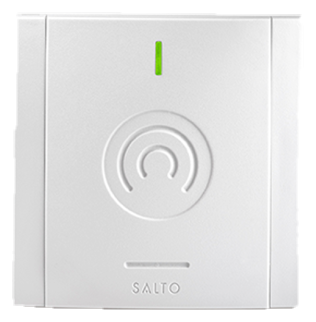
Nodes are the small wireless devices that extend and shape a Salto BLUEnet or RFnet network. The standard node kit boosts the reach of the gateway out to escutcheons that sit beyond its direct range, filling in coverage on a floor or a wing. The BLUEnet inRoomNode is a guest-room version: a smart peripheral that links the room's BLUEnet lock into the in-room ecosystem (energy management and room automation systems such as Interel, Telkonet, VDA, and Inncom), so the lock and the room talk to each other for check-in-aware energy saving. Nodes are specified as part of the wireless network design alongside gateways and repeaters; they are not a standalone product you buy by the door. Because they draw very little power and ship in white, black, or clear gray, nodes disappear into a corridor or a guest room while quietly stitching the network together. On larger properties the node count follows the building's layout and construction, which is something we confirm during the wireless site survey rather than estimate from a floor plan.
Specs
Integrations
Wireless Node connects to hotel PMS, guest-journey, and check-in platforms through Salto’s integration ecosystem, which is extensive and updated frequently. Rather than freeze a partial list, we point you to Salto’s own directory for the current set.
Nodes are wireless-network infrastructure; the inRoomNode bridges the lock to third-party in-room energy and automation systems.
Browse Salto’s integration directory →Decision aid
Not sure if Wireless Node is the right line for your property? The Salto Product Selector compares this against the rest of the Salto portfolio based on your property type and priorities.
Where we install Wireless Node
- HospitalityFloor and wing coverage, plus in-room energy integration via the inRoomNode.
- MultifamilyFilling in wireless coverage across residential floors.
Wireless Node models we configure
Wireless Node is a family, not a single SKU. These are the specific models and variants we spec and install, each on its own page with its configuration and use cases.
Datasheets & documents
Manufacturer documentation for Wireless Node, straight from Salto.
Where Wireless Node fits, and where it doesn’t
Best for
- Extending gateway reach to out-of-range locks (node kit)
- Bridging a guest-room lock to energy and automation systems (inRoomNode)
- Filling wireless coverage across floors and wings
Not ideal for
- Standalone use (nodes are part of a gateway network)
- Replacing a gateway or repeater (different jobs)
- Per-door purchasing without a coverage plan
Sourced from SALTO BLUEnet Wireless product page. Reviewed 2026-06-26 by RevKey.
Things to think about
Two jobs: extend range, and bridge the room
The standard node extends the gateway's reach to out-of-range locks. The inRoomNode is the hospitality piece that links a guest-room lock to energy-saving and room-automation systems. They are part of the network and in-room design, sized at survey.
Sources: SALTO Wireless Node datasheet (PDF), SALTO Wireless Node product page. Reviewed 2026-06-26 by RevKey.
Next step: get a scope for Wireless Node
Send us your property details and we will come back with a real scope for a Wireless Node install, including phasing, brand-standard compliance, and a dated timeline.
Wireless Node: frequently asked
Is the Salto XS4 One good for high-traffic hotel doors?
Yes. XS4 One is a full ANSI mortise lock built for high-cycle guest-room and corridor doors. It runs roughly 60,000 openings per battery set, typically 24 to 36 months of service at hotel traffic. For very high-traffic main entrances it remains the right Salto choice over the compact XS4 Mini.
What is the difference between XS4 One and XS4 Mini?
They share the same credential stack (BLE, NFC, RFID, PIN), the same PMS integrations, and the same brand mobile-key compliance. XS4 One is a full mortise lock suited to high-traffic doors; XS4 Mini is a compact, indoor, lower-cost escutcheon best for value-tier and extended-stay rooms. When brand standards are silent and the door is high-traffic, XS4 One is the safer call.
Does XS4 One support Apple Wallet keys?
Yes. With 2024 firmware, XS4 One supports Apple Wallet room keys alongside BLE and NFC mobile credentials. RevKey confirms the exact firmware and brand mobile-key program your property is certified to before the order ships.
Can XS4 One be retrofitted onto existing doors?
On most doors with ANSI standard mortise prep, XS4 One drops in without millwork changes. If the door prep cannot be modified (occupied units, historic doors, custom millwork), a Neo cylinder swap is usually the better retrofit even though XS4 One is the stronger lock.